Vendor · est. Cebu 2026

Your house,
full every service.

Onka is a restaurant portal built in Cebu. One place to run the whole floor, whether you seat ten or two hundred: a reservations board, a live service timeline, your real floor plan, a guest book, menus, reports — and a page where Cebu diners can find you.

Now onboarding our founding houses across Metro Cebu
₱0
to list. No setup, no monthly minimum.
Beta
live now, built with our founding houses.
5 min
to apply. We reply within a working day.
Cebu
born here, built for houses like yours.
What you get

Built for the floor,
not the boardroom.

Below is the portal as it stands today — the same screens your hosts will open on the tablet at the stand. Big tap targets, and everything a manager needs is one tap down the sidebar.

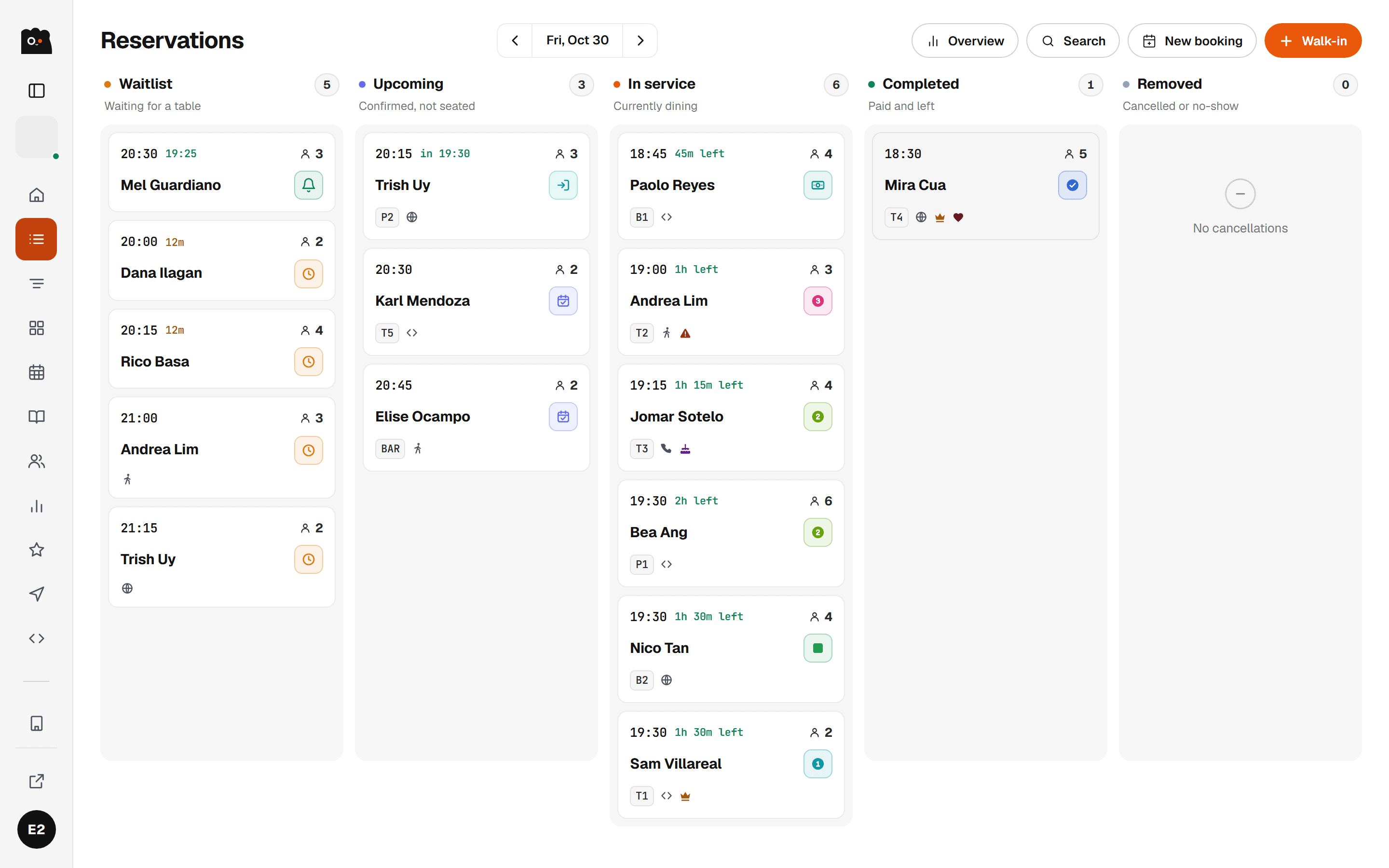
The Onka reservations board, with parties sorted into Waitlist, Upcoming, In service and Completed columns, each card showing the time, party size, table and status.
01

Reservations, on one board

Every booking for the day in four columns — waitlist, upcoming, in service, completed. Check guests in, mark a no-show, take a walk-in, and work the waitlist: notify the next party and they get a window to claim the table before it moves on.

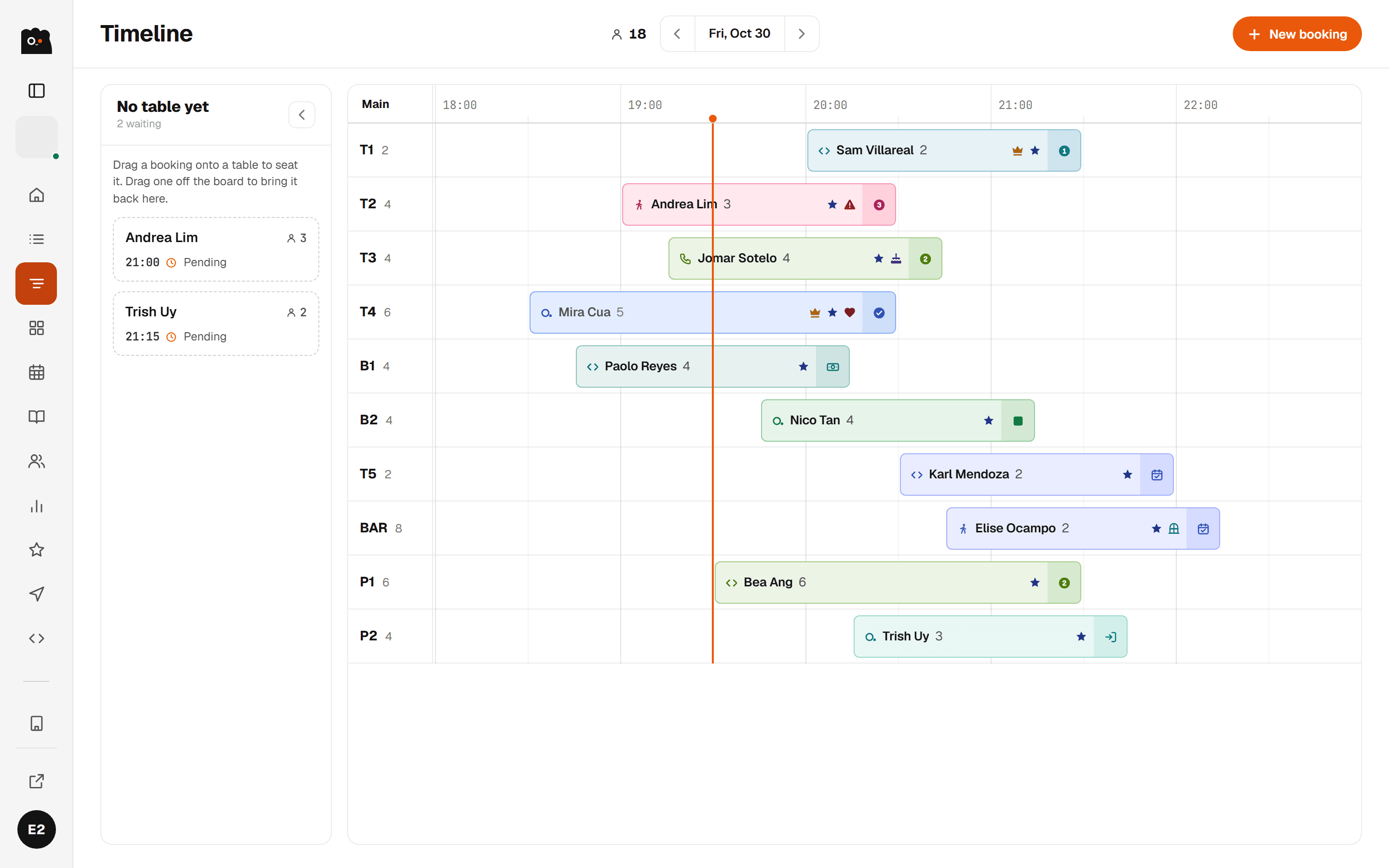
The Onka service timeline: a grid of tables down the left and time across the top, with coloured reservation blocks, a red now-line, and an unassigned parties rail.
02

A timeline of the whole service

Tables down the side, the evening across the top. Drag a party onto a table, stretch the block when they linger, split a big group over two tops or combine two into one. Onka flags overlaps and suggests a table that fits.

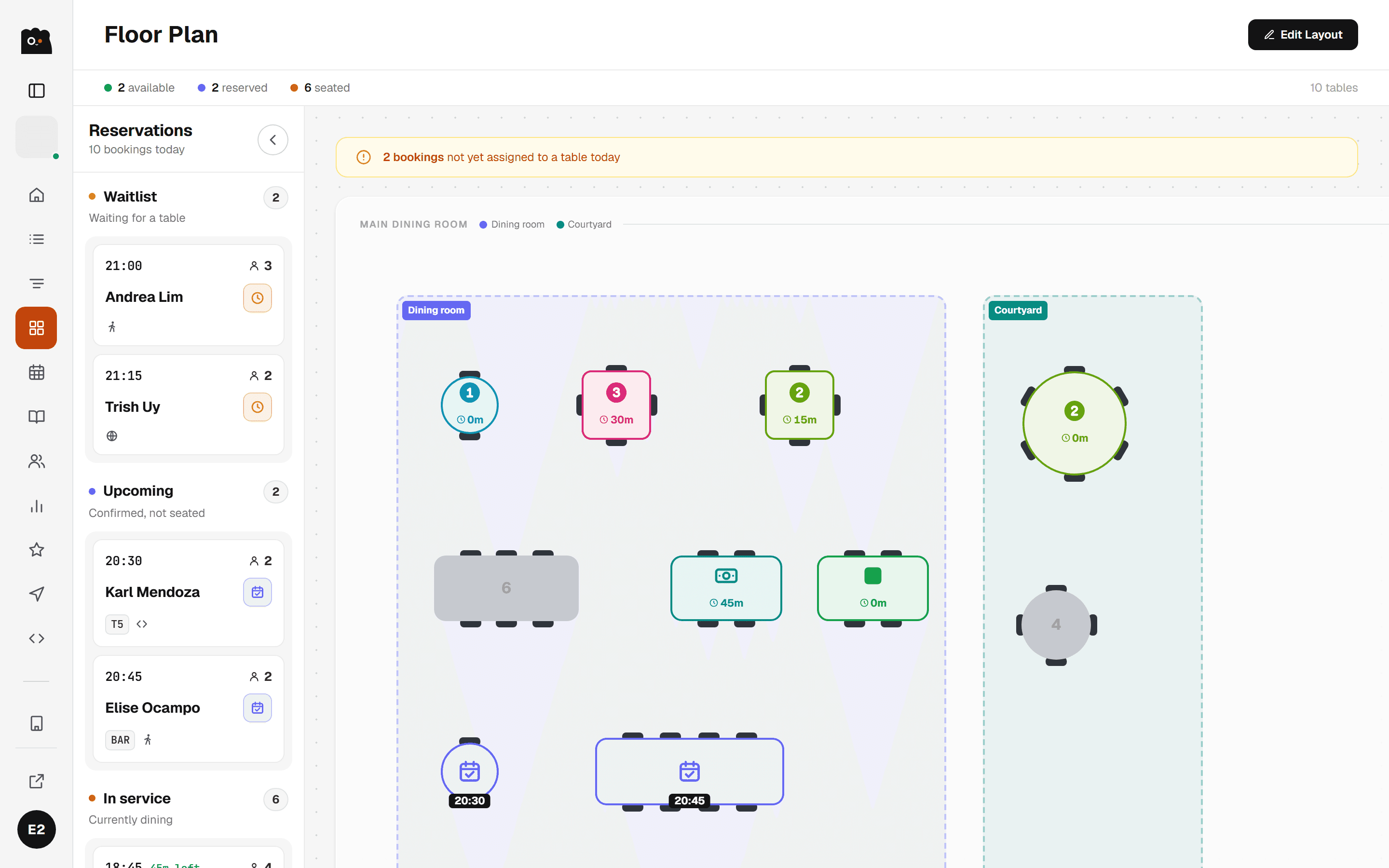
The Onka floor plan in live view, showing tables coloured by status inside named Dining room and Courtyard areas, beside a list of the day's reservations.
03

A floor plan that maps to your floor

Draw your real tables, areas, and bar in the editor, then flip to the live view: open, held, seated, and how long each party has been sitting. Save more than one plan for the nights your room changes shape.

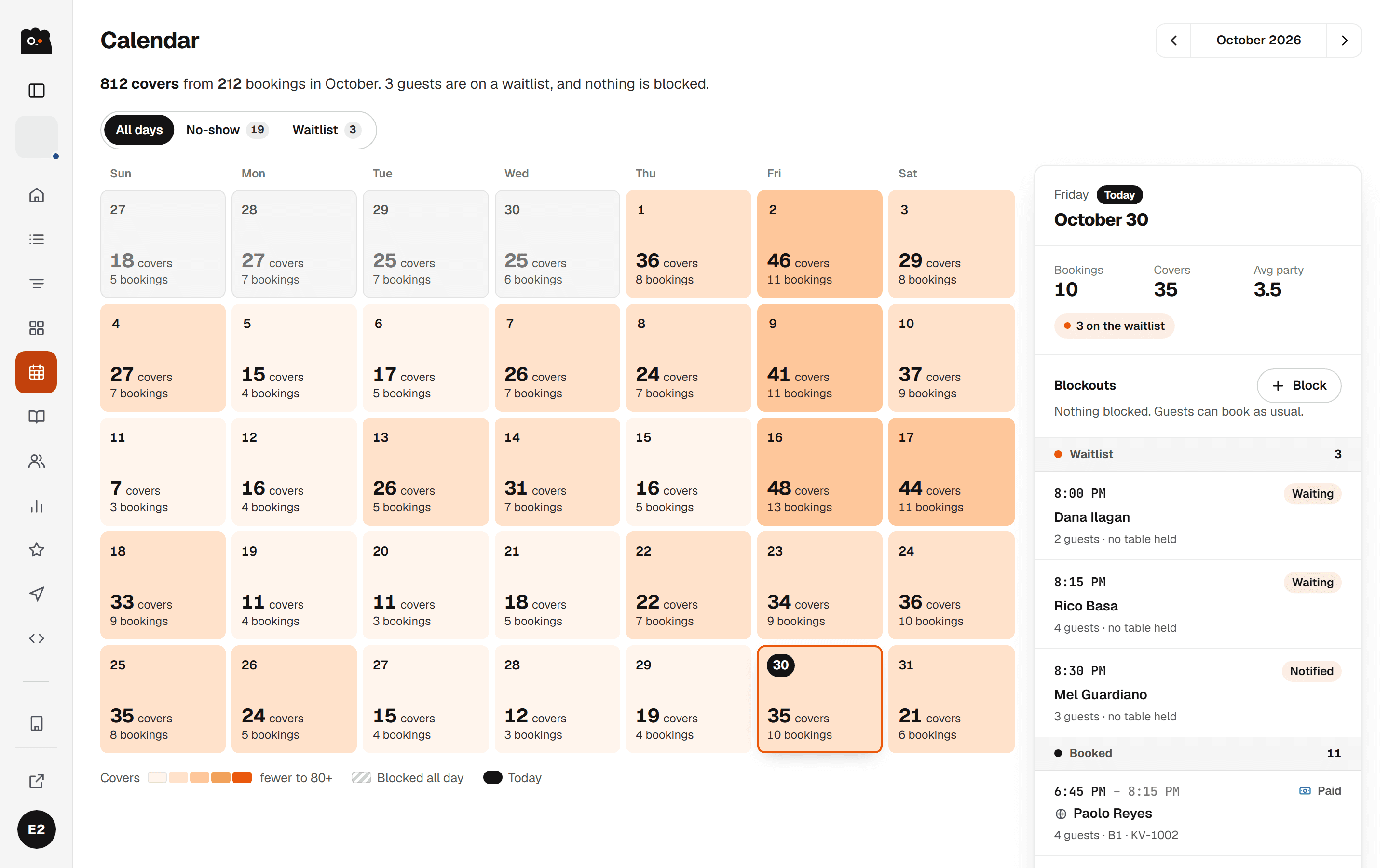
The Onka calendar showing a full month, each day listing its booking count, number of people, and any no-shows or bookings still to confirm.
04

The month, at a glance

A calendar of covers, so you can see the shape of the month before you commit to it — how many bookings and people each day, which days carry no-shows, and what still needs confirming. Tap a day to open it.

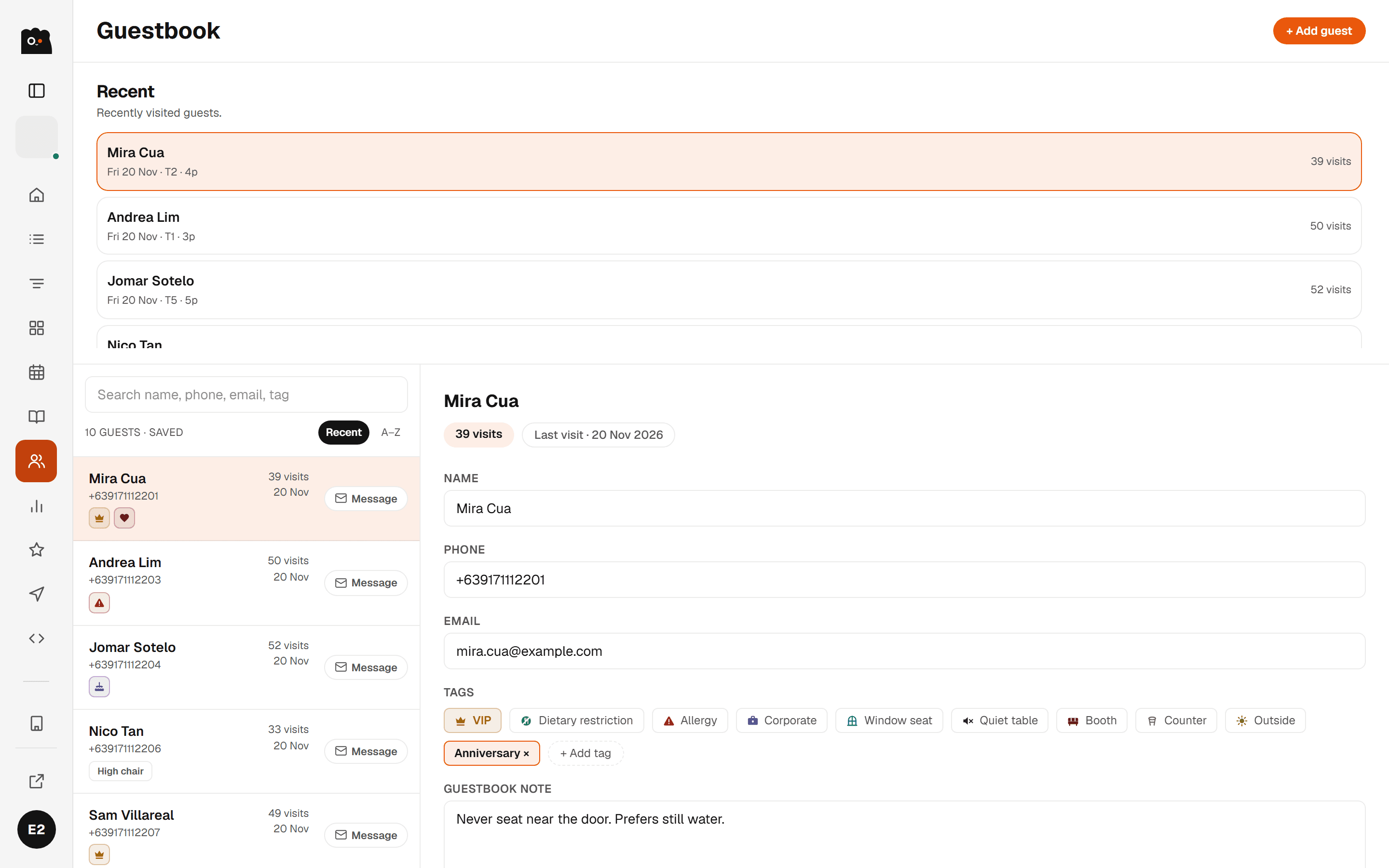
The Onka guestbook: a searchable guest list with tag icons and visit counts, next to an open guest record showing contact details, tags and notes.
05

A guest book, weathered in

Visit history, allergies, seating notes, occasions — kept per guest and surfaced on the booking before they walk in. Regulars are marked automatically once they've been in enough times.

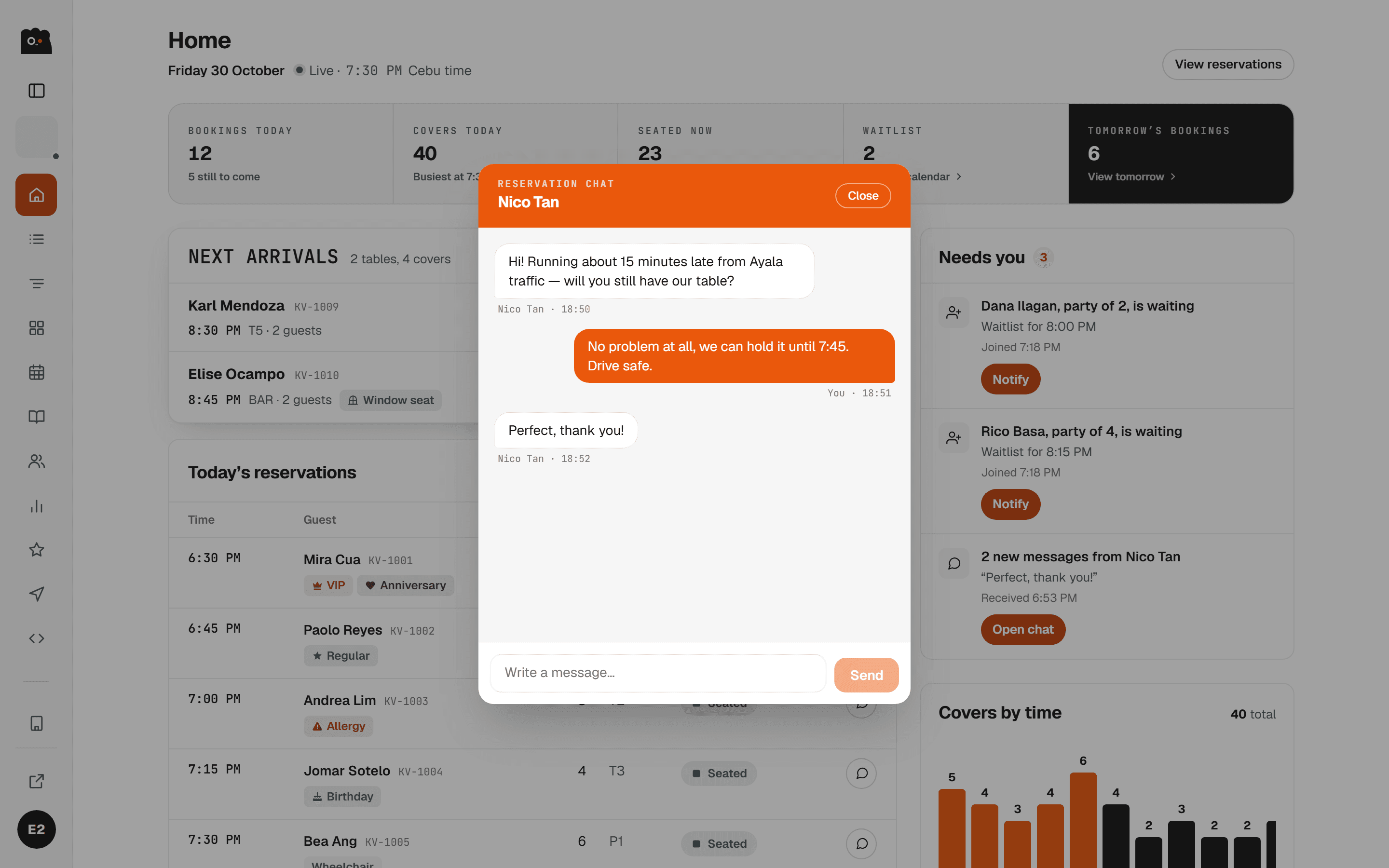
An Onka reservation chat open over the dashboard, showing a guest saying they are running late and the restaurant replying that the table will be held.
06

Message the guest, on the booking

A thread attached to each reservation, so 'we're running late' and 'is the courtyard covered?' land in one place instead of across three phones. Your hosts answer from the same screen they run the floor on.

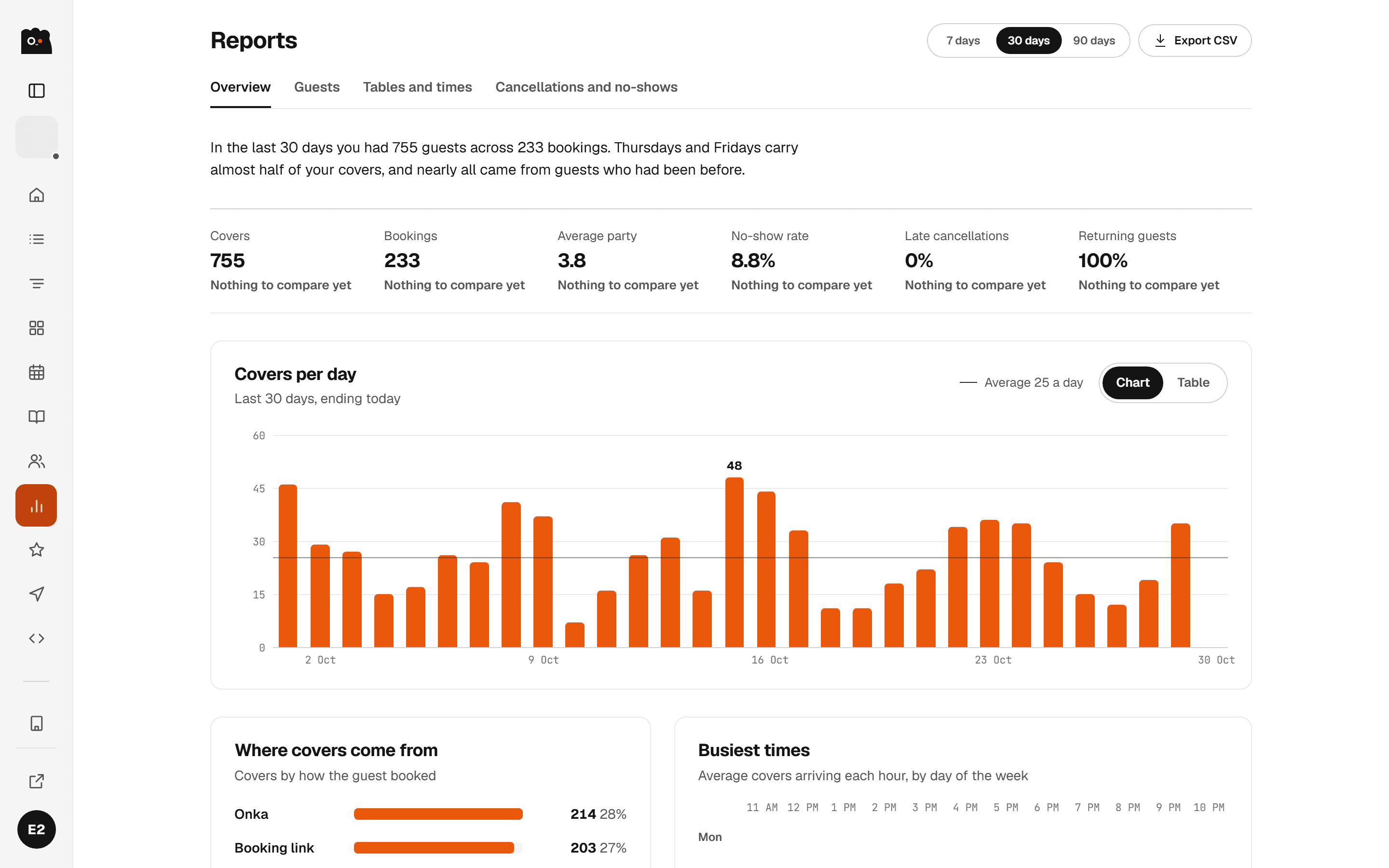
The Onka reports screen with headline figures for total bookings, covers, no-show rate and average party size, a week-on-week comparison, and a covers-by-day table.
07

Reports that answer the Monday question

Thirty days of bookings and covers, this week against last, your busiest time slots, no-show rate, and where confirmed bookings actually came from — your Onka page, your own site, or the host stand.

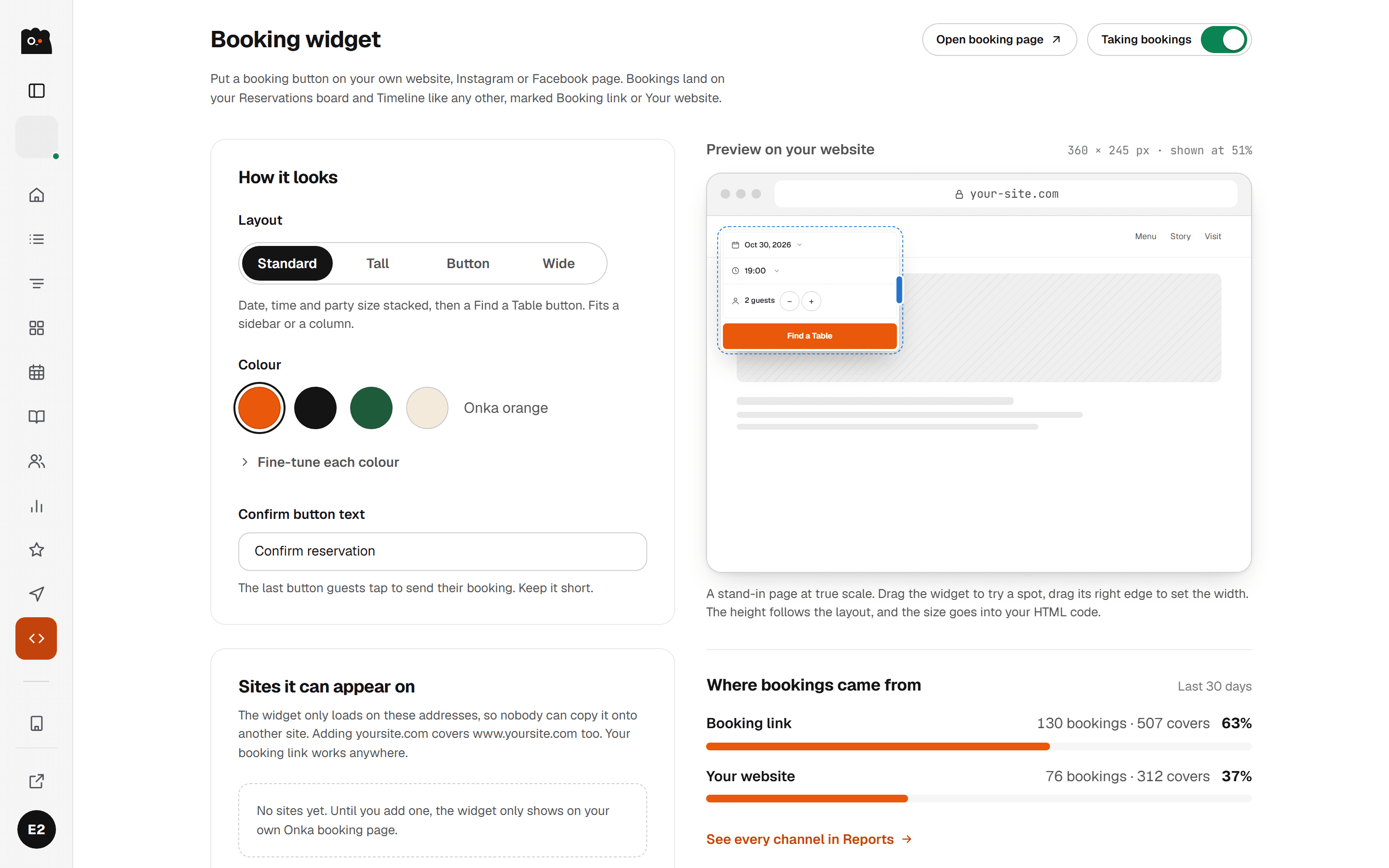
The Onka booking widget screen, showing bookings broken down by hosted page, website embed and direct link, alongside branding controls and a live preview.
08

Take bookings on your own site

Onka gives you a booking widget to paste into your website or link from your socials, styled to your colours. Same availability, same book, and every reservation is tagged with the channel it came from.

How it works

Live by Friday.
For real.

01

Talk for 20 minutes

We sit down with you in person around Metro Cebu, map your tables and hours, and bring in your existing bookings from whatever you use today.

02

Go live the same week

One onboarding session and you can be taking bookings the same week, on the phones and tablets you already have.

03

Read the floor at a glance

From your phone, a tablet, or the laptop in the back office, your floor plan is one tap away.

Pricing

List free.
Run free.

Every foundation your house needs, from reservations to floor plans. Full access while we build Onka.

How pricing will work
  • Onka is in beta — we’re still building.
  • No charges yet, while we test the market together.
  • Founding partners will help set future pricing.
Onka Vendor · Founding Partner
0.00
Reservations board & waitlistIncluded
Service timeline & floor planIncluded
Guest book & guest messagesIncluded
Menus, reviews & your Onka pageIncluded
Reports & booking sourcesIncluded
Booking widget for your siteIncluded
Staff accounts & rolesIncluded
Become a founding partner →
Onka GrowComing soon

Growth tools, when you're ready.

These four screens are already in your sidebar, marked coming soon. Founding partners help decide what lands in them first.

  • Marketing: promotions and offers to bring guests back
  • Integrations: POS and delivery platforms
  • SMS & Viber: booking reminders straight to the guest
  • Billing: plans and invoices, once there is anything to bill
List your restaurant

Tell us about
your house.

Five minutes. No card, no commitment. Onboarding gets back within a working day, usually within a few hours.

  • 01We read every application by hand.
  • 02We come to you for onboarding within Metro Cebu.
  • 03You go live and start taking bookings the same week.
Prefer to talk?
Viber & SMS · +63 968 711 8376 / +63 993 181 5428
Mon–Sun, 9 AM – 7 PM PHT
Email · rafaelsandoy9@gmail.com / gabycouh@gmail.com
Application form · ~5 min1 of 1
The house
How many guests you can seat overall.
On average, what one guest spends on a meal.
You
Why are you contacting us?

Pick anything that sounds familiar. It helps us set you up right.

Already on Onka? Sign in to your dashboard.

Questions

The ones we get most.

Still curious? Contact Us.

How much does Onka cost?+

Nothing right now. Founding partners get full access free while we build together. The plan for later: you only ever pay for a confirmed Onka reservation that actually shows up. No commissions, no per-cover charges, and your own walk-ins are never billed. Diners never pay to book.

How long does it take to get set up?+

One onboarding session. We sit down with you in person around Metro Cebu, map your tables and hours, and bring in your existing bookings from whatever you use today, whether that’s a paper book, an Excel sheet, or another app. You can be taking bookings the same week.

Do I need special hardware?+

No. Onka runs in the browser on any phone, tablet, or laptop you already have at the host stand. Nothing to install, nothing to buy.

Can I still take walk-ins and phone bookings?+

Of course. Walk-ins and phone reservations go into the same book and floor plan as online bookings, so your hosts see one picture of the night. And walk-ins are always free. We never charge for guests you brought in yourself.

Can guests change or cancel their own booking?+

Yes. Guests manage their reservation from their Onka account, so they can move the date, time, or party size, or cancel, without tying up your phone. Every change flows straight through to your reservations and floor plan.

Can my managers and hosts have their own logins?+

Yes. Invite them by email from Accounts and give each one a role — owner, manager, or staff. They sign in as themselves and land in the same portal, so nobody is sharing a password at the host stand.

Can I take bookings on my own website?+

Yes. The Booking Widget screen gives you a booking form to embed on your site or link from your socials. It reads the same availability and writes into the same book, and every reservation is tagged with the channel it came from, so Reports can show you which one actually fills tables.

What happens after the guest leaves?+

Guests can rate the visit and leave a note, and it shows up under Reviews with your average and the star breakdown. The visit is also written into that guest’s history in the Guestbook, so the next time they book you already know them.

Is there a contract or lock-in?+

No. Onka is free while we build together, and you can leave anytime. Your bookings and guest book are yours. If you ever go, we'll hand over all of your data.
Free for
founding partners.

Tell us about your house. Onboarding gets back within a working day, usually within a few hours.